
Library
Over the years we have received donations including hundreds of pieces of guitar music. We are now opening that collection to our members so that it may be heard and enjoyed. Below you will find instructions on library use and access.
We would like to thank the generous donors who have contributed to our Library: Sharon Carne, Bill Frank, Brian Griffiths, Greg Gunhold, Jim Kelly, Bob McAuley, Sherman Montgomery, William Pankhurst, Jacob Salomons
The Library
Everyone is welcome to browse the CGSC Library, but only members of the Guitar Society may check out materials.
Go to this link to browse the library: https://cgsc.librarika.com/search
Getting Member access to the Library (check-out privilege)
Go to this link and follow the instructions to request member access to the Library: https://cgsc.librarika.com/libraries/contact
On the Contact page, click the email link to send an email to the librarian. This can be a single sentence requesting member access. Include your full name. Your member login will use the email address from which you send the request.
You will receive an "Invitation To Join" email with a link to click, which will take you to a web page that asks you to create a password for your account and finalize Library access.
Contacting the Librarian
Use the Contact page to send an email to the Librarian with any comments, questions, or problems: https://cgsc.librarika.com/libraries/contact
Checking out Library items
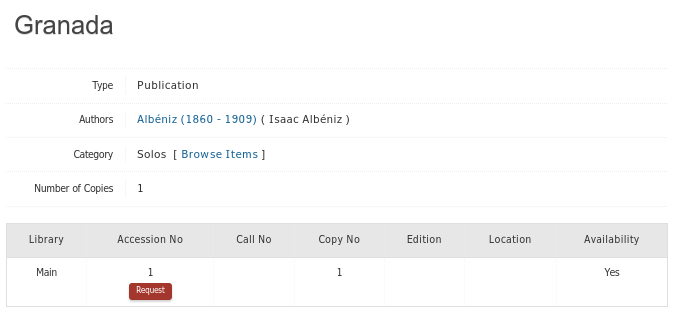
To check out an item from the Library, search for the item you want, and click on its Title to get its Detail page. Then click the red "Request" button. NOTE: if the "Availability" column indicates "No", then the item is already checked out by somebody else.
Help for searching the Library
The Search function works, but not always as expected. We have reported bugs that may or may not ever get fixed. Here are some usage tips.
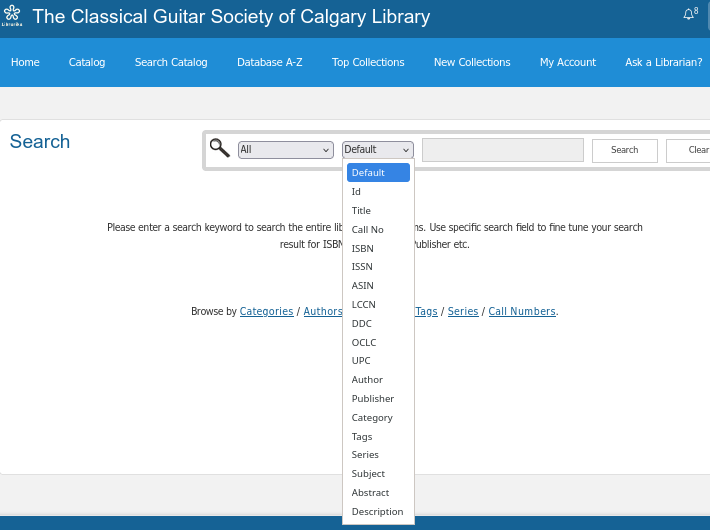
It's most reliable to use the Search page field selector to select the field you want to search, rather than using "Default" (which gives erratic results and doesn't search all of our used fields, namely Description). For example, select "Title", "Author", etc. The exception is when searching by "Edition". It is missing from the Search field selector, but it is searched by the "Default" selection. You can't use substring searches with "Default". You must use whole words, such as "bream" or "emilio" when searching "Default" for specific Editions.
When you select a specific field, your search can use any substring, and foreign characters don't have to be entered exactly. For example, when selecting Author, the search strings "cisc", "rrega", "tarr", and "tárrega" will all find compositions by "Francisco Tárrega".
You might find searching for the Author's name helpful. For example, "Prelude" also appears as "Preludio" and "Präludium". Searching the Author field for "bach" will find them all. Using the Title substring "lud" will find the 3 example spellings, but for other cases you could miss finding things. Also note that for now you need to make a separate search of the Description field to find titles in compilation books. For example, searching Description for "lud" finds many additional preludes than just a Title search. Note that the contents of collections haven't all been added to the Description field yet.
The Library fields we use are: Title, Author, Publisher, Category, Description, Edition.
Field examples:
Title: El Noi de la Mare, Prelude Fugue and Allegro
Author: Isaac Albéniz, Johann Sebastian Bach
Publisher: Ricordi, Faber Music
Category: Accessories, Ensembles, Instruction, Instruments, Solos
Description: (this is where we list the contents of anthology collections and occasionally other information)
Edition: Julian Bream, Emilio Pujol
There are several fields in the Library database that we don't use:
Tags, Series, Subject, Abstract, Call No, ISBN, ISSN, KCCN, DDC, OCLC, UPC.
Library Categories and Types
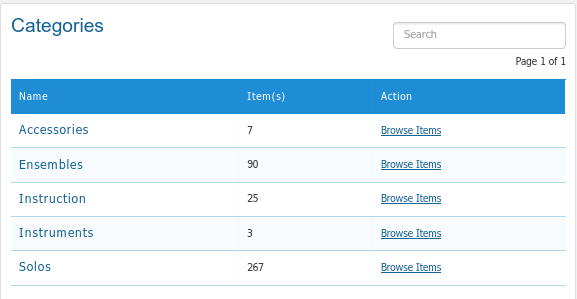
Accessories: foot stools, guitar supports, guitar cases, etc.
Ensembles: guitar with other instruments, including guitar duets, trios, and quartets. However, we add the type of ensemble to the Title of every item, so you can just search Title for what you want (eg duets, flute, etc).
Instruction: methods, technique, scales, etc
Instruments: guitars
Solos: solo guitar compositions
Types (You will see the "Type" column in search results)
Books: anthology collections and Instruction
Publications: solo guitar compositions
Other: Accessories and Instruments
Finding recent additions to the library
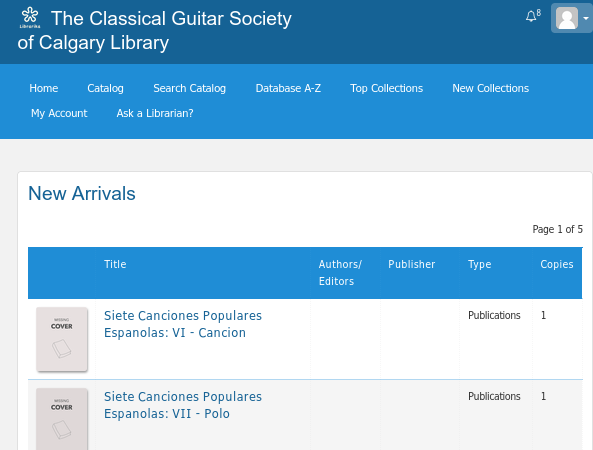
The "New Collections" button in the blue navigation bar shows a list of the last 120 "New Arrivals", with the newest at the top. You might want to make a note of the first (the newest) item on this list when you browse the Library. Then when you come back, you can easily see what has been added since your last visit.
Future enhancements
The library assumes it contains "books", and provides for adding an image of book covers. We hope to add an image of the first page of every piece, but this is a large long-term project. The images are small, but most browsers can "Open image in New Tab" with a right-mouse click or long tap on a mobile.
Here's an example of a score image: https://cgsc.librarika.com/search/detail/13400963
We haven't yet added the contents of all Books (collections) to the Description field yet. It's another large long-term project. Here's an example of one that has been done: https://cgsc.librarika.com/search/detail/13402981